Welcome back, and today I’m going to be showing you how to make a simple mouse trail! Let’s get started!
Start off by creating a new sprite, and making the costume a shape. I’m going to use a red circle, but you can do whatever you want!

Now, head into the code, and create this script:

This will be going to the mouse, and creating the clones! Next, we’re going to make this script!:
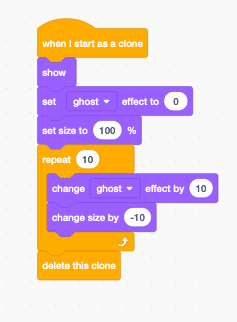
This will make the clones slowly disappear!
Now, press the green flag, and you have a very basic mouse trail! It looks pretty good, right? If you want you could even edit it some more! Maybe make the clones all change color! I’ll show you how to do that! Just add these two blocks to the code you have already!

Now you have a rainbow mouse trail!
You can keep experimenting with the numbers, and everything until you get what you want! Well, that’s all for today! Make sure to like, and subscribe for more tutorials, and leave a comment suggesting an idea for a new one! Have a nice day!


 Sharkyshar
Leave a reply to Quinn Cancel reply