When stop button clicked tutorial!

They already have a “when green flag clicked block”, but have you ever wanted a “when stop button clicked” block? Well, making an actual block for it is impossible, but today I’m going to be showing you how to make the script for one!

Image edited by @sharkyshar

How to make it:

We’re going to start by creating a variable. You can call it whatever you like, but I’m going to call mine “Timer2”.

Now, create this script:

This is setting the “Timer2” variable to always be a tiny bit more than the real timer.

Next, create this script:
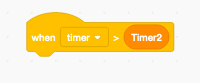
Attach whatever scripts you want to this script, and those will be the ones that happen when you click the stop button! Try it out!

How does this work?: The first script, as I said before, is setting the “Timer2” variable so it’s always ahead of the real timer, but when you press the stop button that script stops, but the real timer keeps going, so that means that the real timer will be more than the variable one, therefore it will trigger the script we have above, and will make it seem as if it’s a “when stop button clicked” block.

What do I use this for?: This could be used for whatever you want. You could even make a whole game based around it! It’s really fun, and interesting to work with! Tell me what you created with it in the comments!
That’s it for today! Make sure to like, and subscribe for more tutorials like this, and join out discord server at: https://discord.gg/jQUE796 Have a good day, and keep scratching!

54 responses to “When stop button clicked tutorial!”

  1. sharkysharfan Avatar
    sharkysharfan

    thx for the help

    Like

    1. Wow thats rlly helpful sharky shar!

      Like

  2. Thank You!

    Like

    1. Hello!

      Like

  3. WOW that works thanks sharky

    Like

  4. I tried, and my crome book shut down instead of making that block!

    Like

  5. BrandonGamingAV80 Avatar
    BrandonGamingAV80

    Do you steal my tutorial????? all the steps you use is all SAME as mine. look at MY real project !
    https://scratch.mit.edu/projects/419442170/

    Like

    1. no, if you look at my account you will see I have a tutorial like this one from over a year ago.

      Like

      1. BrandonGamingAV80 Avatar
        BrandonGamingAV80

        mine is created not from u, when u created this, it makes lot of people think i stole the script from u without giving credit. I didn’t steal the script from u, I used @FUNUT’s how to make a stop sign clicked tutorial, that video is 2 YEARS ago, not 1 year ago. DO YOU USE FUNUTS TUTORIAL WITHOUT GIVING CREDIT?

        Like

      2. no I thought of this myself

        Like

    2. Adelle Saphire Agate Avatar
      Adelle Saphire Agate

      Hey! It doesn’t matter if she stole your tutorial atlis its a tutorial to help other peoples

      Like

      1. I didn’t steal a tutorial though

        Like

      2. Sharkyshar did no steal that tutoria.l Ok?
        It me https://scratch.mit.edu/users/HarryPoter1607/

        Like

  6. I did not know you could do that!

    Like

  7. Hi sharkyshar! It’s Ruqaiyya2019 from scratch. I love this. Used it and it worked

    Like

  8. :O I was wondering about that!

    Like

  9. where do i find the ‘when [timer] < Timer2 pls help me :<

    Like

    1. in the “events” block section

      Like

  10. found it 😛

    Like

  11. That is going to be helpful when making games thanks

    Like

  12. Wooooooooooooooooooooooooooooooooooooooooooooooooooow
    Niceeeeeeee

    Like

  13. Thank!

    Like

  14. Thank you so much Sharky! This is so helpful! Now I don’t have to make a thumbnail for my projects now! Please follow DUELAnimations on Scratch! I haven’t made any games yet but I am working hard on a game called Aliens and it’ll be cool! Byeeee!

    Like

  15. Thanks a lot!

    Like

  16. Umm..it didn’t work for me because I’m on a apple.

    Like

    1. I’m on apple too and it works

      Like

      1. sharky i love you

        Like

  17. Cool!

    Like

    1. OMG its amazing, tysm!

      Like

  18. Ty for this! I could make it a secret in some of my projects! I’m physicsmoon on scratch.

    Like

  19. it work when i click only on the green flag…

    Like

  20. I know this is not what kind of topic we are on, but do you have any tips on editing?

    Like

  21. Thanks, Sharky! It worked! I used this is my About Me

    Like

  22. Sisters_Amazing Avatar
    Sisters_Amazing

    Hi! I follow you on scratch. You are amazing! I have always wanted a When Stop Button Clicked script!

    Like

  23. I always use this for my animation Thanks Sharky!

    Like

  24. THXXXXXXXXXXXXXXXXXXXXXXXXXXXXXXXXXXXXXXXXXXXXXX

    Like

    1. I made the word “bruh” being very small but when the stop button is clicked, it starts growing bigger.

      Like

  25. I made the word “bruh” very small, but when you click the stop button, it starts growing.

    Like

Leave a comment