They already have a “when green flag clicked block”, but have you ever wanted a “when stop button clicked” block? Well, making an actual block for it is impossible, but today I’m going to be showing you how to make the script for one!

How to make it:
We’re going to start by creating a variable. You can call it whatever you like, but I’m going to call mine “Timer2”.

Now, create this script:

This is setting the “Timer2” variable to always be a tiny bit more than the real timer.
Next, create this script:
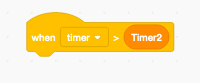
Attach whatever scripts you want to this script, and those will be the ones that happen when you click the stop button! Try it out!
How does this work?: The first script, as I said before, is setting the “Timer2” variable so it’s always ahead of the real timer, but when you press the stop button that script stops, but the real timer keeps going, so that means that the real timer will be more than the variable one, therefore it will trigger the script we have above, and will make it seem as if it’s a “when stop button clicked” block.
What do I use this for?: This could be used for whatever you want. You could even make a whole game based around it! It’s really fun, and interesting to work with! Tell me what you created with it in the comments!
That’s it for today! Make sure to like, and subscribe for more tutorials like this, and join out discord server at: https://discord.gg/jQUE796 Have a good day, and keep scratching!


 Sharkyshar
Leave a reply to KatGames1236 Cancel reply